**You CANNOT withdraw any funds unless you have made your first deposit**
Step 1:
Go to My Account ▸ Withdraw, choose your method, enter the amount, and submit. Typical processing time will be displayed once you choose the method of withdrawal.
Step 2:
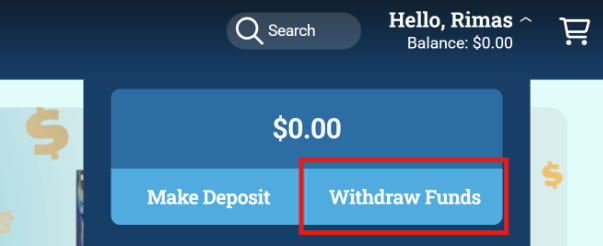
When signed in, click on “Hello, (Your Name)” in the top right corner, then click on “Withdraw Funds”.
Step 3:
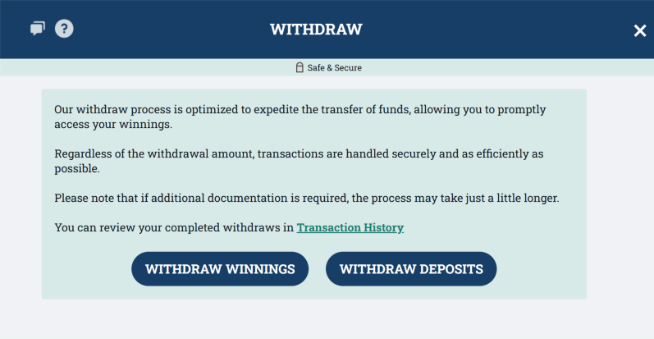
Review the statement about withdrawals and then click “Withdraw Winnings” or “Withdraw Deposits”.
Step 4:
Use the drop-down menu to select which withdrawal method you would like to use. Depending on the method you choose, you will either be asked to provide information on the form or log into your Banking Account. Once you do, enter the amount you would like to withdraw, fill in the required information, then click “Submit”.
Step 5:
The first time you do a new withdrawal method, a two-factor authentication (2FA) email will be sent to the email associated with your Mass Lottery Player Account with a 6-digit code. Enter the code in the space provided and click “Submit”.
Step 6:
If you have not previously provided identification for making a deposit or withdrawal, or the first time you use ACH for withdrawal, you will be asked to upload additional documentation to prove account ownership. You can either choose manual or automated processes for confirming your government ID.
If you choose automated, you will follow the steps to scan your ID. If the automated ID scan passes, you are finished. If the scan does not pass, you will need to manually upload the documents below.
If you choose manual, you will need to upload a photo of your government-issued ID, driver’s license, or passport.
Step 7:
Once you see the “Request Received” screen, your withdrawal has been submitted. Watch for an email confirmation stating the withdrawal has been complete.