Desktop:
Step 1:
Click on the “Sign Up” button in the top right part of your screen.

Step 2:
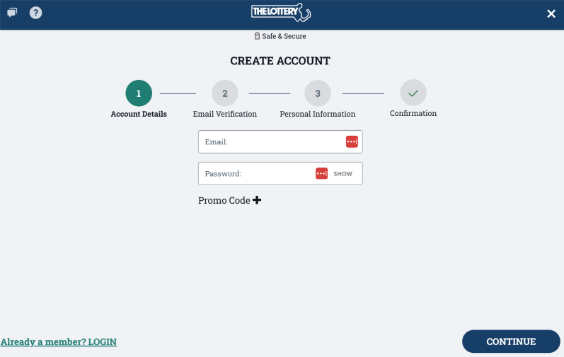
Enter a valid email address and password, then click “Continue”
*Note: Your password must be between 8 and 16 characters long and must contain 2 different types of characters (a-z, A-Z, 0-9, and special characters).
Step 3:
Your account must be verified for security purposes, an email will be sent to the email address you used containing a 6-digit code. Enter the code in the space provided and click “Continue”. You may need to check your Spam/Junk folder. If one is not sent in 10 minutes, please click “Resend Code”.
Step 4:
Enter your personal information, read the Terms & Conditions, and accept them. Review the Responsible Gaming page, then click “Submit” to continue the registration process.
Step 5:
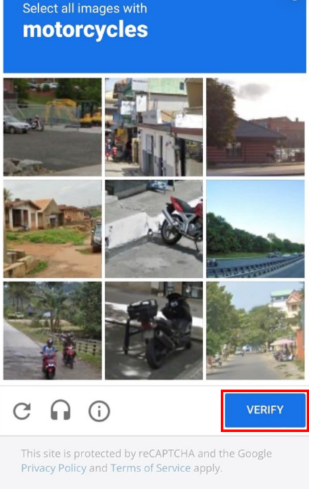
Complete the reCAPTCHA by selecting all images containing the specified object, then click “Verify”. The images you need to select may differ from the example shown.
Step 6:
The registration process is complete, play responsibly!
Mobile:
Step 1:
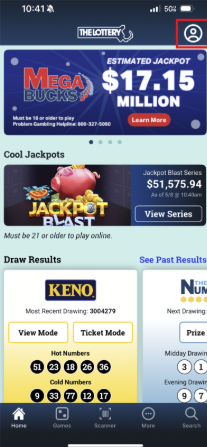
Click on the  icon in the top right corner, then click on “Register”.
Step 2:
Then you will enter a valid email address and password. You will need access to this email to verify your account. Click “Next”.
Step 3:
Check your email for a 6-digit code that will be sent to you to verify your account and enter this code in the space provided and click “Next”. You may need to check your Spam/Junk folder.
Step 4:
Enter the required information, read the Terms & Conditions, and accept them. Review the Responsible Gaming page, then click “Submit” to continue.
Step 5:
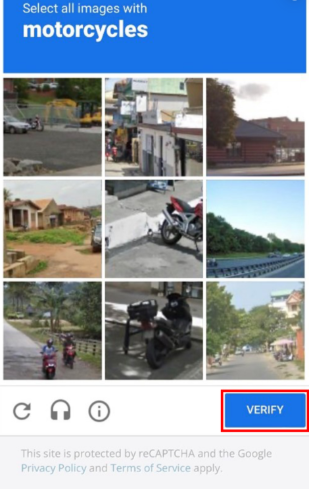
Complete the reCAPTCHA by selecting all images containing the specified object, then click “Verify”. Once you see the confirmation screen, you are all set!
Step 6:
The registration process is complete, play responsibly!