Desktop:
Step 1:
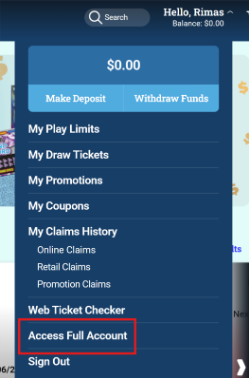
While logged in, click on “Hello, (Your Name)” in the top right corner, then click on “Access Full Account”.
Step 2:
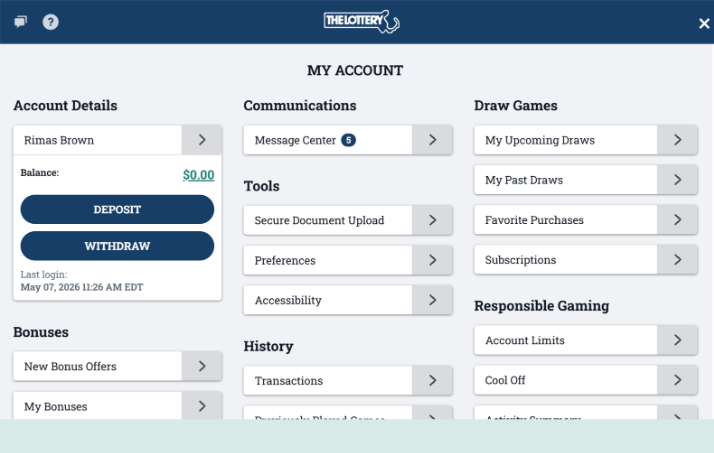
You will be taken to the “My Account” dashboard. Here you can access features like Account Details, Communications, Draw Games, Bonuses, History and Responsible Gaming.
Mobile:
Step 1:
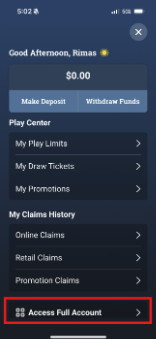
Click on the  icon in the top right corner, then click on “Access Full Account”.
Step 2:
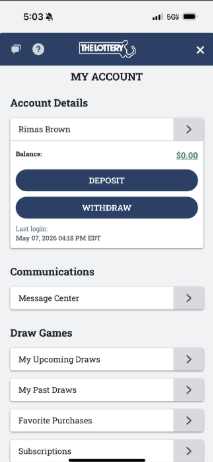
You will be taken to the “My Account” dashboard. Here you can access features like Account Details, Communications, Draw Games, Bonuses, History and Responsible Gaming.
Was this article helpful?
That’s Great!
Thank you for your feedback
Sorry! We couldn't be helpful
Thank you for your feedback
Feedback sent
We appreciate your effort and will try to fix the article